gBell Patient Access

Patients get an answer. The request keeps moving.

gBell answers in the practice's name, confirms who is calling, works the real schedule, and leaves staff a finished change or one exact question.

Talk to gBell live
Line 1Call ended

gBellThis is gBell, the practice's automated assistant. This call is recorded.

CallerHi, it's Helen Chen. I need to move Thursday's visit.

gBellI can help. First, your date of birth?

CallerAnything later that day?

gBellDr. Patel has 2:30 or 4:00 on Thursday. Which works better?

Caller2:30, please.

gBellDone. Thursday at 2:30 PM with Dr. Patel. A confirmation is on its way.

CallerCan I take ibuprofen before the cleaning?

gBellThat one is for your care team. I've sent them your question with this call attached.

CallerGreat, thank you.

Caller
Not yet matchedHelen Chen
Visit
Hidden until matchedThu 9:00 AMThu 2:30 PM
The requestWaiting on staff
  1. Name and birth date, before any visit detail.
  2. 1:00 short2:30 picked4:00 open
  3. Thu 9:00 AM to Thu 2:30 PM, confirmed.
  4. One question for staff

    Can Helen take ibuprofen before Thursday's 2:30 cleaning?

Call length 0:52
Choose any step on the request to see that moment of the call.
Call it yourself

Hear gBell take a request.

Play a sample call to hear how gBell sounds with a patient. Then have gBell call you and try a request yourself.

Sample callReady to play

Helen moves Thursday's visit.

gBell confirms who she is, offers only open times, writes the change, and sends her clinical question to staff.

0:00 / 0:00
Audio placeholder
Transcript
Choose a word to jump there0:00

Now let gBell call you.

Leave your name, work email, and phone. gBell calls you and works a sample scheduling request with you, start to finish.

Talk to gBell live
  1. 01

    Leave your name, work email, and phone.

  2. 02

    gBell calls you from

    +1 (619) 776-0351
  3. 03

    Ask to move a sample appointment and listen for the read back.

Use your own details. Keep patient information out of the call.Sample requests only
Audio placeholder: there is no recorded patient call yet, so playback is timed to the transcript. The live call is real.
Appointment scheduling

The schedule can say no.

An appointment change should end with a changed appointment. When the requested time breaks a practice rule or no valid opening exists, gBell offers the next allowed option or prepares a staff handoff. It doesn't invent a slot.

Request
Move Thursday's appointment.
Identity
Patient matched before appointment detail appears.
Rules
Visit type, provider, location, and open times checked.
Choice
Thursday at 2:30 PM confirmed by the patient.
Result
Appointment changed, confirmation sent, record updated.
Thursday, 17 Sep
Dr. Patel. Helen needs a 60 minute cleaning.
9:00 AMHelen Chen, cleaningThe visit she can't makeMoving
10:00 AMBookedNot offered
1:00 PM30 minutes openToo short for a 60 minute visitNot offered
2:30 PM60 minutes openOffered, chosen by Helen, written onceBooked
4:00 PM60 minutes openOffered as the second choiceOffered
Read from the practice schedule5 slots checked
Finished work, or a handoff with the story attached.

  1. Patient

    Who made the request.

  2. Request

    What they need.

  3. Transcript

    What was said.

  4. Work completed

    The checks and actions gBell already finished.

  5. Next decision

    The exact question waiting for staff.

Handoff for staff
Line 1, 16 Sep 2026, 10:14 AM
Patient
Helen Chen, matched on name and date of birth.
Request
Move Thursday's 9:00 AM cleaning. Asked whether she can take ibuprofen beforehand.
Transcript
"Can I take ibuprofen before the cleaning?"
At 0:41 of a 0:52 recorded call
Work completed
  1. Identity matched
  2. Schedule rules checked
  3. Moved to Thu 2:30 PM, confirmation sent
Next decision
Can Helen take ibuprofen before Thursday's 2:30 cleaning?
Waiting in the consoleOne question
Where staff see it

The console, up close.

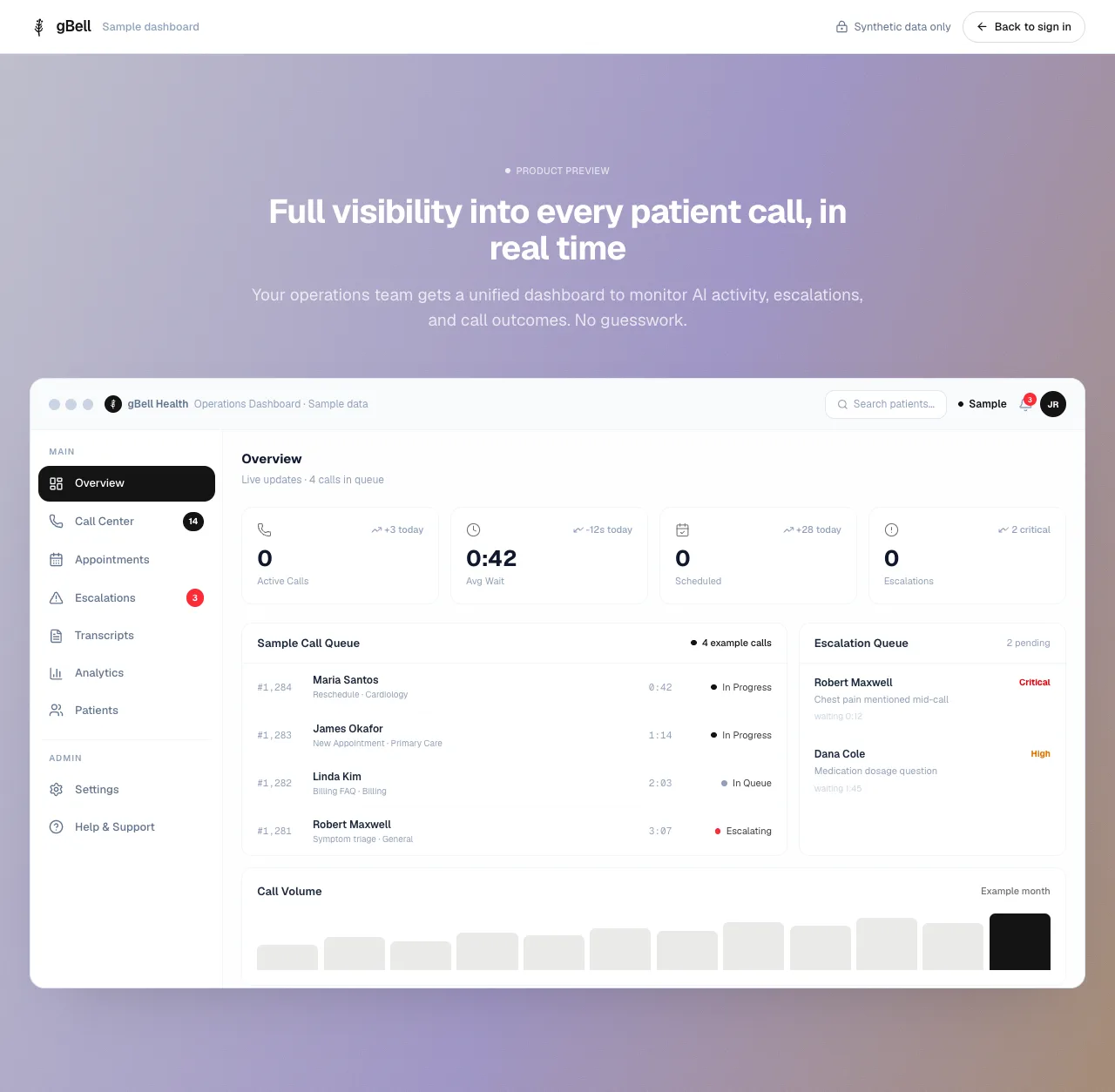
The handoff doesn't live in a voicemail or a sticky note. It waits in the gBell console. This is the real console with synthetic data. Open a numbered point.

The gBell operations console with synthetic data: a sidebar, four overview counts, a call queue, an escalation queue, and a call volume chart.
Explore the sample console

The public sample console uses synthetic patient data. Practice records stay inside the clinic account.

A patient can always need a person. Requests outside gBell's authority move to staff with the conversation attached. Emergency language directs the caller to emergency services and flags the request at the highest priority.

Outside the rulesStaff, conversation attached
Emergency languageEmergency services, highest priority
Clinical questionStaff, one exact question
Asks for a personStaff, under practice rules

The practice keeps authority.

Clinic-scoped roles, separate access grants, MFA, session control, and audited support access keep staff work inside the practice boundary.